

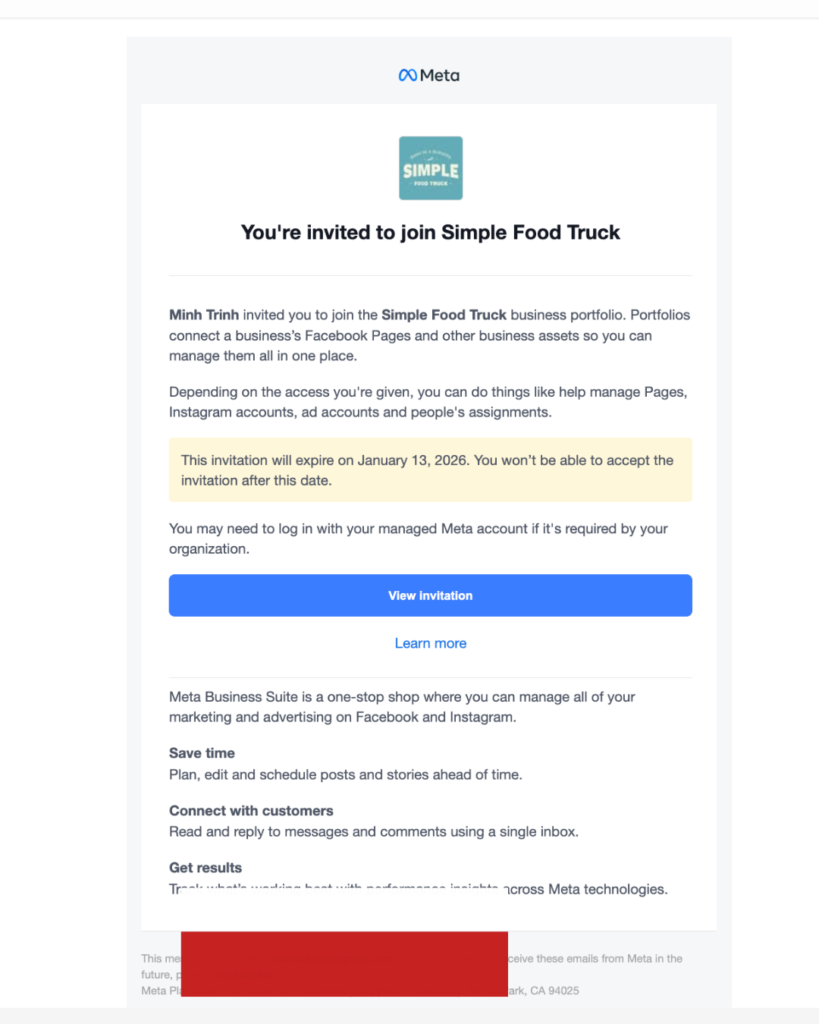
Over the last few months, a wave of “Facebook Business” invitations has been hitting inboxes with subjects like “Action required” and “You’re invited to join our business portfolio.” One example is an invite to join a “Simple Food Truck business portfolio” that sends you to business.invitepagemanage.com, a domain that does not belong to Meta and fits a known phishing pattern used to hijack pages and ad accounts.
What the fake invite looks like
In this scam, the email or notification looks like a genuine Meta Business invitation, often using a clean design, Facebook colours, and urgent copy such as “Action Required: You’re invited to join our business portfolio.” The key visual elements are: a Meta logo, a business name or portfolio name (“Simple Food Truck”), a blue button like “View portfolio” or “Open business invite,” and a footer that resembles real @facebookmail.com messages.
The real problem – the domain
The safest way to judge an invite is to look at where the button actually goes, not how the email looks. In these scams, the “View” or “Accept” button redirects to domains like business.invitepagemanage.com or other “page‑manage / business‑invite” domains, which are not part of Facebook’s official domains (facebook.com, fb.com, business.facebook.com, meta.com).
Security reputation tools have already flagged similar domains (for example, business.suite‑pagemanage.com, page‑manage‑business.com, business‑management‑invitation.top) as low‑trust and potentially linked to phishing operations. Once you land there, scammers can show you a fake login screen or trick you into granting access to your Business assets, which can lead to hijacked pages, drained ad accounts, and changed payment details.
How this scam campaign works
Recent research shows this is not an isolated case but part of a much larger phishing pattern abusing Meta Business Suite’s own invitation features. Attackers create fake Facebook Business pages, then send invitations that are sometimes delivered via the real facebookmail.com domain, making them extremely hard to distinguish from legitimate notifications.
From there, the links redirect to phishing sites hosted on external domains that mimic Meta’s login or policy pages to steal credentials or request unnecessary permissions. Reports indicate that thousands of small businesses in sectors such as marketing, education, real estate, and hospitality have received these emails, with some victims losing access to pages and suffering unauthorised ad spends.
Red flags you should always check
To make this practical, include a visual checklist graphic (you can build it in Canva) summarising the red flags.
Key red flags to explain in text:
-
Domain mismatch: If the link opens business.invitepagemanage.com or any domain that does not end with facebook.com, fb.com, or meta.com, close the tab immediately. I’m sorry
-
No matching alert in Business Suite: If the email claims “Action required” but you do not see any corresponding alert under Business Settings → Requests or Page notifications, it is likely a scam.
-
Too much urgency: Warnings that your page will be disabled “within 24 hours” unless you click a link are classic social‑engineering tricks.
-
Unexpected invites: If you never spoke with the sender (for example, a random “Simple Food Truck” portfolio) and they are offering access out of nowhere, treat it as suspicious until proven otherwise.II don’t know what to say
Safe way to handle any Facebook Business invite
-
Never trust the email button blindly. When you get an invite or warning, do not click the link; instead, manually type business.facebook.com in your browser or open the Meta Business Suite.
-
Verify from inside Meta. Go to Business Settings → Requests/Invites and see if there is a genuine access request or notification; act only from inside the platform.
-
Check the domain before logging in. If you ever see a login or verification page, confirm that the address bar ends with facebook.com or meta.com before entering your details.
-
Enable two‑factor authentication (2FA). Turn on 2FA for all admins and ad managers; this adds a layer of protection even if credentials leak.
-
Report and educate your team. Mark these emails as phishing in your mail client and share internal screenshots (with sensitive data blurred) so your team learns how to recognise them.