
If you are here, I am assuming that you are running ads on Facebook and Instagram. If you are wondering how to set your Facebook ads to run only on specific time periods during the day, you have come to the right place.
Let’s dive straight into the topic, why should you schedule Ads? How will you know when to schedule your ads? Facebook page insights come in handy here. You can get information about your page’s performance and audience data, the actions they are taking on the page, the time when they are active etc.
To access page insights;
- From your News Feed, click Pages in the left menu.
- Go to your Page.
- Click Insights in the left menu.
NB- You can only have access to data in the page for the last 2 years and most of the data only gets available only when there is data of more than 100 or more people on the page. Note that page categorized as community pages do not have insights.
Scheduling Ads on Facebook
In order to schedule Ads, go to the Ad set in the Ads Manager.
Create a new ad set or edit an existing one.
Go to the Budget and Schedule section in the ad set.
Choose Lifetime budget from the Budget and schedule dropdown.
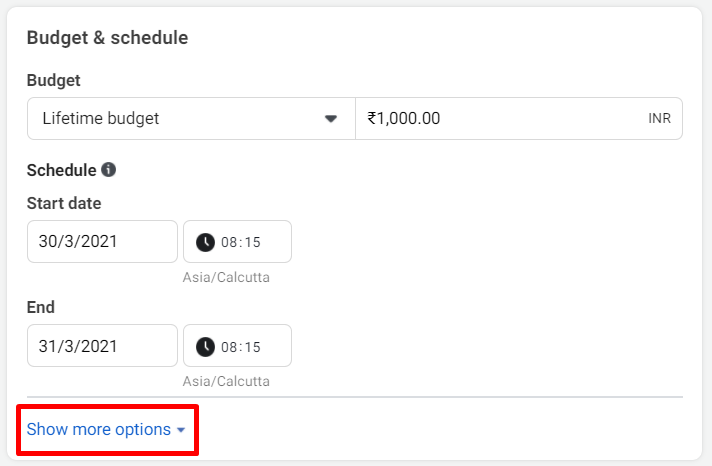
- Select Show more options, hover over Ad Scheduling and select Edit.

Select Run ads on a schedule.
Choose the blocks of time when you want your ad set to run.

NB- Note that you have to run your ads for at least one hour.
- After selecting the time, click on Continue and your ad set is scheduled.
If you need my help with your ads, schedule a call with me here.
How to schedule Facebook ads in Ads Manager (updated for 2026)
Ad scheduling lets your ads run only on certain days and hours, for example during office hours when your sales team can call leads back.
- Create or edit a campaign in Meta Ads Manager.
- Choose a lifetime budget. Ad scheduling is only available with lifetime budgets, not daily budgets. If you use Advantage campaign budget, set the lifetime budget at campaign level.
- Set a start and end date.
- Under the budget and schedule options, choose Run ads on a schedule.
- Select the days and hours you want, and choose whether to use the viewer’s time zone or your ad account’s time zone.
- Publish, then check delivery after the first scheduled window.
“Ad scheduling can only be used with lifetime budgets”
If you see this message, your campaign or ad set uses a daily budget. Switch to a lifetime budget with an end date, and the scheduling option appears. If you need a daily budget, you can instead pause and restart ads at set times using automated rules.
When ad scheduling makes sense
- Lead generation where fast callbacks matter, such as real estate, clinics and education
- Businesses with limited sales or support hours
- Offers tied to specific days, such as weekend site visits
For most campaigns, start without a schedule, then use your results by hour and day to decide when to run. Want help with your campaigns? Talk to a Facebook Ads specialist.
Free audit: Want me to look at your account with you? Apply for a free Meta Ads audit on Google Meet. I take only two a week.
New: ChatGPT now shows ads, and businesses in India, the UAE and Australia can run them. If you want to test them, talk to a ChatGPT ads expert.